Goal Workflow Usage Guide
AI-driven development workflow — from PRD to shipped code
github.com/smallnest/goal-workflow
Usage Guide — Six-step closed-loop development workflow: Plan, Design, Break Down, Implement, Review, Ship.
Contents
- 1. Overview
- 2. Installation
- 3. Workflow Overview
- 4. Step 1: /prd — Requirements Planning
- 5. Step 1.5: /prd-to-spec — PRD to Technical SPEC
- 6. Step 1.6: /to-issues — Break Down into Issues
- 7. Step 2: /goal — Feature Implementation
- 8. Step 3: /review-it — Code Review
- 9. Step 4: /ship-it — Commit and Ship
- 10. Bonus: /humanize-it — De-AI Text Rewriting
- 11. Bonus: /insight-diagram — UML and Architecture Diagrams
- 12. Bonus: /refactor — Expert-Level Code Refactoring
- 13. Bonus: /modern-go — Go Code Modernization
- 14. Bonus: /note-it — Implementation Notes
- 15. Bonus: /code-to-spec — Reverse-Generate SPEC
- 16. Bonus: /smell — Architecture Smell Detection
- 17. Bonus: /loop-it — Automated Issue Implementation Loop
- 18. Bonus: /to-design — PRD to Design Document
- 19. Bonus: /graph — Parallel Task-Graph Execution
- 20. Bonus: /understand — Interactive Change Review
- 21. Bonus: /walkthrough — Phase-2 Walkthrough Plan
- 22. Supported Platforms
- 23. FAQ
1. Overview
Goal Workflow is a collection of AI-driven development workflow skills built for Claude Code / Codex. It breaks down the complete software development lifecycle into standardized steps, each driven by a dedicated Skill.
It enables AI agents to act like experienced engineers — from understanding requirements, breaking down tasks, writing code, reviewing quality, to final submission and merge — autonomously completing the entire process. You just describe the feature idea, and the workflow handles the rest.
/prd
Requirements document generation + Issue breakdown
- Clarifying questions → structured PRD
- Decomposed into independently implementable Issues
- Supports GitHub / Local / iCafe
/prd-to-spec
PRD to technical design SPEC
- PRD requirements → architecture + API + data model
- Error handling + security + performance strategies
- Issue mapping + implementation plan
/to-issues
Break PRD/SPEC into vertical-slice Issues
- Vertical slices (tracer bullets), not layers
- Explicit blocking edges, blockers created first
- Supports GitHub / Local, standalone
/goal
Pick a card for end-to-end implementation
- Pick an Issue, implement it
- Complete one feature per session
- Claude Code or Codex
/review-it
Automated code review and repair
- Detect uncommitted changes or branch diff
- Findings → iterative fixes
- Until review passes
/ship-it
Commit → PR → Merge → Close
- Commit linked to Issue number
- Squash merge + delete branch
- Add implementation summary and close card
/understand
Interactive review of fresh AI-generated changes
- Scan uncommitted / branch changes into a webpage
- File tree + syntax-highlighted diff + per-segment notes
- Each segment shows its requirement and a plain-language explanation
/walkthrough
Phase-2 walkthrough plan after verification
- Change summary in human terms, not a diff dump
- Verification steps with real command / test output
- Visual proof + review gate before merging
/humanize-it
Iterative de-AI text rewriting
- Auto-select best humanization strategy
- Three-path skill iteration until target met
- Up to 42 rounds of intelligent switching
/insight-diagram
UML and architecture diagram generator
- Analyze codebase structure
- UML / architecture diagrams / flowcharts
- Rendered as HTML+SVG
/refactor
Expert-level code refactoring
- 22 code smell detections
- 40+ refactoring techniques (Fowler catalog)
- Five-phase safety protocol
/modern-go
Go code modernization
- 35+ gofix-style transformation rules
- Full coverage Go 1.0 to 1.26+
- Auto-detect version + safety guard
/note-it
Implementation notes
- Design decisions / deviations / tradeoffs
- Tracking open questions
- Saved as HTML in docs/
/code-to-spec
Reverse-generate project SPEC
- Analyze code, config, tests, structure
- Generate 12-chapter complete SPEC
- Supports multi-level deep analysis
/smell
Architecture smell detection
- 8 categories: architecture, coupling, cohesion, design, code, testing, naming, complexity
- 50+ anti-patterns and bad smells detected
- Detailed markdown report with refactoring roadmap
/loop-it
Automated batch issue implementation
- Fetch issues → dependency sort → implement loop
- Checkpoint/resume with .loop-state.json
- Structured error recovery (10 error classes)
/to-design
PRD to design document (Go proposal style)
- A decision doc on "why this approach"
- Proactively lists rejected alternatives + reasons
- Distinct from SPEC: a decision artifact, not a contract
/graph
Parallel task-graph execution (DAG + supersteps)
- Task/PRD → DAG → layered into superstep waves
- Independent nodes per wave implemented concurrently by subagents
- Each node runs /goal→/review-it→/ship-it in its own worktree
2. Installation
Install all skills in one command via the npx skills CLI:
# Install all skills from this repository
npx skills add smallnest/goal-workflow

# Or install a specific skill
npx skills add smallnest/goal-workflow --skill prd
npx skills add smallnest/goal-workflow --skill prd-to-spec
npx skills add smallnest/goal-workflow --skill to-issues
npx skills add smallnest/goal-workflow --skill review-it
npx skills add smallnest/goal-workflow --skill understand
npx skills add smallnest/goal-workflow --skill walkthrough
npx skills add smallnest/goal-workflow --skill ship-it
npx skills add smallnest/goal-workflow --skill humanize-it
npx skills add smallnest/goal-workflow --skill insight-diagram
npx skills add smallnest/goal-workflow --skill refactor
npx skills add smallnest/goal-workflow --skill modern-go
npx skills add smallnest/goal-workflow --skill note-it
npx skills add smallnest/goal-workflow --skill code-to-spec
npx skills add smallnest/goal-workflow --skill smell
npx skills add smallnest/goal-workflow --skill loop-it
npx skills add smallnest/goal-workflow --skill to-design
npx skills add smallnest/goal-workflow --skill graph
npx skills add smallnest/goal-workflow --skill design-it
npx skills add smallnest/goal-workflow --skill article-icons
npx skills add smallnest/goal-workflow --skill listenhub-tts

# Global install (available for all projects)
npx skills add smallnest/goal-workflow -g

# Install to a specific agent
npx skills add smallnest/goal-workflow -a claude-code
Prerequisites
| Tool | Purpose | Install |
|---|---|---|
gh | GitHub CLI (Issue/PR operations) | brew install gh && gh auth login |
claude | Claude Code CLI | npm install -g @anthropic-ai/claude-code |
npx | npm package runner | Bundled with Node.js |
/prd, /prd-to-spec, /to-issues, /loop-it, /review-it, /ship-it, /refactor, /modern-go, /note-it, /code-to-spec, /humanize-it, /insight-diagram, /smell, /to-design, /graph, /understand, /walkthrough, /design-it, /article-icons, /listenhub-tts in Claude Code to directly invoke the corresponding skill.
3. Workflow Overview
Six-step closed loop, from requirements to delivery:
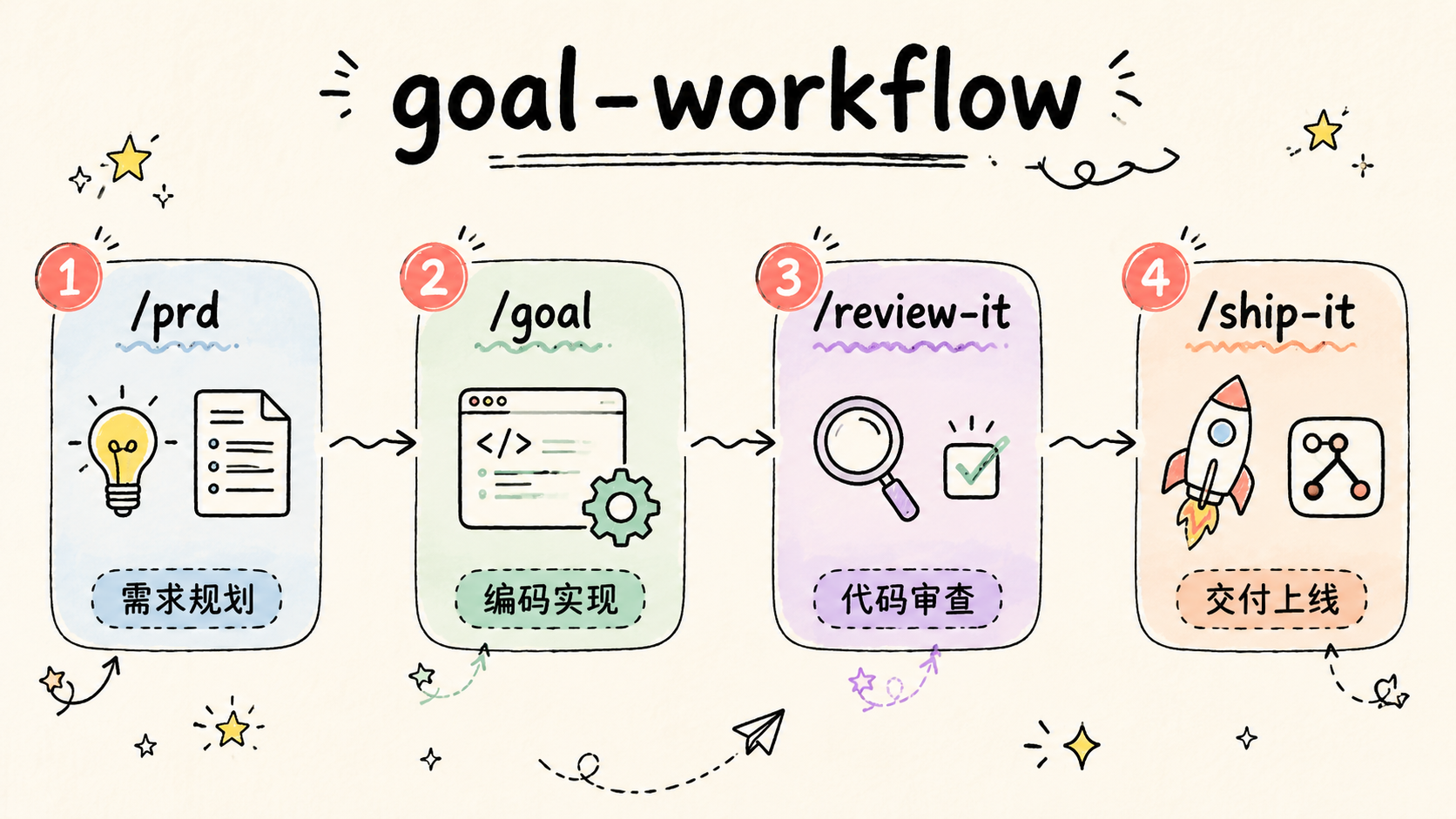
| Step | Command | Input | Output |
|---|---|---|---|
| 1. Plan | /prd |
Feature description / product idea | PRD document + Issue cards |
| 1.5 Design | /prd-to-spec |
PRD document | Technical SPEC (optional) |
| 1.6 Break Down | /to-issues |
PRD / SPEC document | Issue cards |
| 2. Implement | /goal |
An Issue card | Runnable code implementation |
| 3. Review | /review-it |
Code changes (dirty / branch) | Clean code that passes review |
| 4. Ship | /ship-it |
Reviewed code | Merged PR + Closed Issue |
4. Step 1: /prd — Requirements Planning
/prd transforms a vague feature idea into a structured product requirements document and breaks it down into independently implementable Issue cards.
How to Invoke
# Type directly in Claude Code
/prd Add a priority feature to our task management system

# Or use trigger phrases
Write PRD for: User registration with email and phone support
Requirements analysis: Add rate limiting capability to the API
Workflow
- Agent asks 3-5 clarifying questions (with letter options, reply quickly with "1A, 2C, 3B")
- Generates structured PRD based on answers (User Stories, Functional Requirements, Non-Goals, Acceptance Criteria)
- Presents PRD for review; confirm or adjust
- Saves PRD to
tasks/prd-[feature-name].md - Breaks down PRD into Issue list; presents for confirmation
- Selects creation mode (GitHub / Local / Baidu iCafe) and creates Issues
Output Example
# Generated Issue list
📋 Generated 4 Issues from PRD:

#1: Add priority field to database (backend, high)
#2: Display priority indicator (frontend, high) — depends on #1
#3: Add priority selector (frontend, medium) — depends on #1
#4: Filter tasks by priority (frontend, medium) — depends on #1, #25. Step 1.5: /prd-to-spec — PRD to Technical SPEC
/prd-to-spec transforms a product requirements document (PRD) into an implementable technical design SPEC. PRD says "what to build"; SPEC says "how to build it".
How to Invoke
# Type directly in Claude Code
/prd-to-spec tasks/prd-priority-system.md

# Or use trigger phrases
PRD to design: Convert priority PRD to technical plan
Technical spec: Generate SPEC based on prd-user-auth.md
PRD → SPEC Mapping
| PRD Element | SPEC Chapter | Transformation |
|---|---|---|
| User Stories | Business Logic + Test Mapping | Stories → algorithms + test cases |
| Functional Requirements | API Design + Business Logic | FR → endpoints + implementation logic |
| Acceptance Criteria | Testing Strategy | Criteria → concrete test scenarios |
| Non-Goals | Open Questions | Explicitly scoped exclusions |
| Technical Considerations | Architecture + Performance | Constraints → design decisions |
SPEC Output Structure (11 Chapters)
| # | Chapter | Content |
|---|---|---|
| 1 | Summary | Scope, PRD reference, design decision summary |
| 2 | Architecture | System context, component design, file structure |
| 3 | Data Model | Schema changes, entity definitions, migration plan |
| 4 | API Design | Endpoint table, request/response schema, error responses |
| 5 | Business Logic | Core algorithms, validation rules, state machines, edge cases |
| 6 | Error Handling | Error classification, retry strategies, degradation plan |
| 7 | Security | Authentication/authorization, input validation, data protection |
| 8 | Performance | Expected load, optimization strategies, database considerations |
| 9 | Testing Strategy | Unit/integration/E2E tests + acceptance criteria mapping |
| 10 | Implementation Plan | Implementation phases, Issue mapping, incremental delivery |
| 11 | Open Questions & Risks | Unresolved questions, technical risks, assumptions |
Workflow
- Locate PRD file (auto-scan tasks/ or manually specified)
- (Optional) Analyze existing codebase: architecture, tech stack, patterns, conventions (skip if no codebase — propose architecture from scratch)
- Ask 3-5 technical clarification questions (with options)
- Generate complete SPEC document
- Present for review; confirm or iterate
- Save to
tasks/spec-[feature-name].md
/prd-to-spec is an optional step. For most small to medium features, the Functional Requirements and Acceptance Criteria in the PRD are sufficient for the AI agent to make autonomous technical decisions during the /goal phase — the agent automatically analyzes the codebase, understands the architecture, and chooses the right implementation path without needing a pre-written SPEC. Consider running /prd-to-spec only in the following scenarios:
- Multiple people or agents developing in parallel, needing shared technical conventions
- Large changes spanning multiple services/modules, where architecture decisions have broad impact
- Team has compliance or review process requiring design documents
- PRD is vague and needs upfront technical detail to reduce interpretation variance
6. Step 1.6: /to-issues — Break Down into Issues
/to-issues breaks down a PRD and/or SPEC into vertically-sliced, independently implementable Issues and creates them on your chosen platform. It can be used standalone — no need to run /prd first.
/goal.
How to Invoke
# Type directly in Claude Code
/to-issues

# Or use trigger phrases
Create issues for: Create Issues from prd-user-auth.md
Break down issues: Break down implementable cards from SPEC
Generate cards: Break PRD and SPEC together into Issues
Input Sources
| Option | Description |
|---|---|
| Auto-detect | Scan tasks/ directory, list available PRDs and SPECs |
| Specify PRD | Break down based only on PRD's User Stories |
| Specify SPEC | Use SPEC's Issue Mapping chapter as primary guidance |
| PRD + SPEC | (Recommended) PRD provides requirements, SPEC provides technical conventions — most complete Issues |
Creation Platforms
| Platform | Tool | Description |
|---|---|---|
| GitHub | gh issue create | Native blocking edges --blocked-by, sub-issues --parent (gh v2.94+) |
| Local | Markdown files | One file per Issue, dependency-ordered, in a per-feature folder |
Workflow
- Locate input files (auto-detect or manually specify PRD/SPEC)
- Find prefactoring ("make the change easy" groundwork) and order it first
- Break down into vertical-slice Issues with a demo path and explicit Blocked by edges, numbered in dependency order
- Quiz the user: granularity, blocking edges, and whether each demo path is a behaviour rather than a layer
- Select creation platform (GitHub / Local)
- Create blockers first, then output a summary report (including the ready-to-start frontier)
expand → migrate → contract sequence — the one exception to the vertical-slice rule.
/to-issues is the key bridge from requirements to implementation. It can be used independently — even if you didn't use /prd to generate a PRD, as long as you have a requirements document (or even pasted text), you can break it down into Issues.
7. Step 2: /goal — Feature Implementation
/goal is Claude Code's built-in goal-driven development mode. Pick an Issue card and the agent understands the acceptance criteria and implements end-to-end.
Usage
# Claude Code: specify GitHub Issue number
/goal #42

# Claude Code: specify local Issue file
/goal tasks/issues/issue-001-add-priority-field.md

# Codex: use --goal flag
codex --goal "Implement issue #42: Add priority field to database"
Agent Behavior
- Read Issue description and acceptance criteria
- Analyze codebase structure, understand context
- Write implementation code
- Run tests and type checks
- Verify UI changes in browser
- Confirm each acceptance criterion is met
/goal is a built-in feature of Claude Code and is not included in this skill package. It naturally integrates with this workflow — the Issue format generated by /prd is exactly what /goal expects as input.
8. Step 3: /review-it — Code Review
/review-it performs automated review before committing, discovering potential issues and iteratively fixing them until the review passes.
How to Invoke
# Review uncommitted changes (default mode)
/review-it

# Review entire branch vs main
/review-it --mode branch

# Review + tests in parallel
/review-it --parallel-tests "npm test"
Review Principles
| Principle | Description |
|---|---|
| Advisory | Review results are suggestions, not blindly applied |
| Verify | Every finding is verified by reading real code paths |
| Reject noise | Reject impractical edge cases, speculative risks, excessive refactoring |
| Iterate | Re-review after fixes until no actionable findings remain |
| Minimal | Prefer small fixes; avoid unnecessary large refactors |
Review Modes
| Working Tree State | Mode | Action |
|---|---|---|
| Uncommitted changes | local | Direct /review |
| Committed not pushed | branch | git diff origin/main...HEAD + review |
| Pushed / PR | branch | Same as above, auto-detect PR base |
| Clean working tree | skip | No review needed |
/review-it supports Claude Code, Codex, OpenCode, and DeepSeek TUI, automatically adapting to each agent's review commands.
9. Step 4: /ship-it — Commit and Ship
/ship-it is the standard closing workflow after implementation is complete: commit code, create PR, merge, add implementation summary, close Issue.
How to Invoke
# Invoke in Claude Code
/ship-it

# Or use trigger phrases
Submit code
Create PR and merge
Complete Flow
# Step 1: Commit code (link Issue)
git add <related files>
git commit -m "Add priority field to database (#42)"

# Step 2: Push branch
git push -u origin feat/issue-42-priority-field

# Step 3: Create PR (body includes Closes #42)
gh pr create --title "Add priority field" \
  --body "Closes #42 ..."

# Step 4: Merge
gh pr merge --squash --delete-branch

# Step 5: Close Issue (if not auto-closed)
gh issue close 42 --reason completed
Error Handling
| Scenario | Handling |
|---|---|
| CI checks failed | Check failure reason, fix and append commit then push |
| Merge conflict | Rebase origin/main, resolve conflicts then force push |
| Branch protection | Confirm required reviews are satisfied |
| Issue not auto-closed | Confirm PR body contains Closes #N, or close manually |
/ship-it depends on the gh CLI. Make sure you've authenticated with gh auth login.
10. Bonus: /humanize-it — De-AI Text Rewriting
/humanize-it rewrites specified documents to remove AI-generated feel. It automatically selects the most appropriate humanization strategy based on document type, iterating until the result meets quality standards.
How to Invoke
# Type directly in Claude Code
/humanize-it docs/architecture.md

# Or use trigger phrases
De-AI: Rewrite this document in natural language
Reduce AIGC: humanize docs/blog-draft.md
Sub-Skill Capability Matrix
| Skill | Best For | Style |
|---|---|---|
humanizer-zh | General text, blogs, copywriting | Natural, warm, opinionated |
humanize-chinese | General + academic + long-form text | Multi-style (Zhihu/Xiaohongshu/academic/literary etc.) |
technical-writing | Technical docs, architecture docs, review drafts | Plain, rigorous, defensible |
Automatic Strategy Selection
| Document Type | Priority Strategy Order |
|---|---|
| Technical documentation | technical-writing → humanizer-zh → humanize-chinese |
| Academic paper | humanize-chinese (academic) → humanizer-zh → technical-writing |
| General text | humanizer-zh → humanize-chinese → technical-writing |
| Long-form text (≥1500 chars) | humanize-chinese (longform) → humanizer-zh → technical-writing |
Iteration Mechanism
- Auto-detect document type, select first rewriting skill
- After rewriting, score on 5 dimensions (AI trace removal / naturalness / information completeness / style consistency / readability)
- Score ≥ 80 passes; output result
- If not meeting target, switch to next skill, continuing to optimize on top of previous rewrite
- Auto-switch if same skill shows no improvement for 3 consecutive rounds
- After all skills used once, start a new round from the beginning with new combinations
- Maximum 42 iterations; output current best result
11. Bonus: /insight-diagram — UML and Architecture Diagrams
/insight-diagram generates UML diagrams, architecture diagrams, and flowcharts for any project. After analyzing the codebase, it lets users choose which diagram types to generate, renders them as HTML+SVG, and saves to the docs/ directory.
How to Invoke
# Type directly in Claude Code
/insight-diagram

# Or use trigger phrases
Generate architecture diagram: Analyze project structure and generate architecture diagram
Draw flowchart: Draw call flow diagram for this module
Generate UML: Generate class diagram and sequence diagram
Supported Diagram Types
A total of 17 diagram types, divided into structural and behavioral categories:
Structural Diagrams (Static)
| # | Diagram Type | Focus |
|---|---|---|
| 1 | System Architecture Diagram ★ | Component relationships, global perspective (non-UML, most common) |
| 2 | Class Diagram | Defining classes, attributes, operations, and relationships |
| 3 | Object Diagram | Object instances and their relationships at a specific moment |
| 4 | Component Diagram | System components and their dependencies |
| 5 | Deployment Diagram | Physical hardware, nodes, and software deployment |
| 6 | Package Diagram | Grouping model elements for organization |
| 7 | Composite Structure Diagram | Internal structure of a class |
| 8 | Profile Diagram | Extending UML metamodel, custom stereotypes |
Behavioral Diagrams (Dynamic)
| # | Diagram Type | Focus |
|---|---|---|
| 9 | Flowchart ★ | Main flow and branches (non-UML, most common) |
| 10 | Use Case Diagram | System functionality from user perspective |
| 11 | Activity Diagram | Process flow or steps |
| 12 | State Machine Diagram | State transitions over an object's lifecycle |
| 13 | Sequence Diagram | Object interactions over time |
| 14 | Communication Diagram | Focus on organizational relationships between objects |
| 15 | Timing Diagram | Focus on timing constraints of state changes |
| 16 | Interaction Overview Diagram | Combines activity and sequence diagrams |
| 17 | Swimlane Diagram | Cross-component/role responsibility flow (activity diagram variant) |
★ Indicates most commonly used diagram types. Default recommended combination: Architecture Diagram + Sequence Diagram + Flowchart.
Workflow
- Analyze project codebase, identify key components and dependencies
- Present list of available diagram types; user selects which to generate
- Use architecture-diagram skill to render as HTML+SVG
- Save output to
docs/directory
src/services/ directory" or "focus on the database layer", to generate more targeted results.
12. Bonus: /refactor — Expert-Level Code Refactoring
/refactor provides expert-level code refactoring based on Martin Fowler's complete catalog from Refactoring 2nd Edition. By identifying code smells and applying proven refactoring techniques, it improves code maintainability, readability, and structure without changing external behavior.
How to Invoke
# Type directly in Claude Code
/refactor

# Or use trigger phrases
Refactor: Refactor UserManager class, it's too large
Code smell: This function has Feature Envy, fix it
Extract method: Break this long method into smaller functions
Code Smell Catalog
Identifies 22 code smells, organized into five categories:
| Category | Smells | Primary Refactoring |
|---|---|---|
| Bloaters | Long Method | Extract Method, Replace Temp with Query |
| Large Class | Extract Class, Extract Subclass | |
| Primitive Obsession | Replace Data Value with Object | |
| Long Parameter List | Introduce Parameter Object | |
| Data Clumps | Extract Class | |
| OO Abusers | Switch Statements | Replace Conditional with Polymorphism |
| Temporary Field | Extract Class, Introduce Null Object | |
| Refused Bequest | Replace Inheritance with Delegation | |
| Alternative Classes with Different Interfaces | Rename Method, Extract Superclass | |
| Change Preventers | Divergent Change | Extract Class |
| Shotgun Surgery | Move Method, Move Field | |
| Parallel Inheritance Hierarchies | Move Method, Move Field | |
| Dispensables | Comments (code self-explanatory) | Extract Method, Rename Variable |
| Duplicate Code | Extract Method, Pull Up Method | |
| Lazy Class | Inline Class, Collapse Hierarchy | |
| Data Class | Move Method, Encapsulate Field | |
| Dead Code | Delete (Git history has record) | |
| Speculative Generality | Inline Class, Remove Parameter | |
| Couplers | Feature Envy | Move Method |
| Inappropriate Intimacy | Move Method, Move Field | |
| Message Chains | Hide Delegate | |
| Middle Man | Remove Middle Man | |
| Incomplete Library Class | Introduce Foreign Method |
Refactoring Techniques Catalog
40+ refactoring techniques in 6 categories, each with mechanical steps and comparison examples:
| Category | Count | Representative Techniques |
|---|---|---|
| Composing Methods | 9 | Extract Method, Inline Method, Extract Variable, Replace Temp with Query, Substitute Algorithm |
| Moving Features | 7 | Move Method, Move Field, Extract Class, Inline Class, Hide Delegate |
| Organizing Data | 13 | Replace Data Value with Object, Encapsulate Field, Replace Type Code with Subclasses, Replace Magic Number |
| Simplifying Conditionals | 8 | Decompose Conditional, Guard Clauses, Replace Conditional with Polymorphism, Introduce Null Object |
| Method Calls | 13 | Rename Method, Separate Query from Modifier, Introduce Parameter Object, Replace Error Code with Exception |
| Generalization | 9 | Pull Up Method, Push Down Method, Extract Interface, Form Template Method, Replace Inheritance with Delegation |
Safety Protocol
- Preparation Phase: Write characterization tests → commit current state → create refactoring branch
- Each Step: One change at a time → compile passes → all tests pass → commit
- Verification Phase: All tests pass → manual smoke test → self-review diff → final commit
- Iron Rule: Don't change external behavior, don't mix with feature changes, every step backed by tests
Language-Specific Guides
| Language | Key Recommendations |
|---|---|
| Java | final locals, IDE auto-refactor, Records, Sealed Classes |
| TypeScript | Destructuring reduces params, prefer const, Union Types replace type codes, ?. eliminates null checks |
| Python | Type Hints, dataclasses, @property, Context Managers |
| Go | Small interfaces, named return values, table-driven tests, early returns eliminate nesting |
| Rust | Result/Option replace error codes and null, Pattern Matching, From trait, Derive macros |
13. Bonus: /modern-go — Go Code Modernization
/modern-go automatically upgrades Go code to modern idioms and APIs, similar to go fix. It scans go.mod to detect the Go version, then batch-applies version-appropriate transformation rules to Go source files, covering 35+ rules from Go 1.0 through 1.26+.
How to Invoke
# Type directly in Claude Code
/modern-go

# Or use trigger phrases
Modernize: Modernize this project's Go code
Upgrade Go code: Update to Go 1.22 idioms
Gofix: Scan pkg/ directory and apply transformations
Workflow
- Read
go.modto get Go version - Find
.gofiles within target scope (specified file/directory/entire project) - Scan each file for "Before" patterns, apply all transformations for versions ≤ project version
- Each transformation includes a concise comparison table and code examples (before/after)
- After editing, run
goimports -wto clean imports - Output transformation report: file count, transformations applied, rules skipped
Transformation Rule Catalog (by Go Version)
| Version | Rules | Example (Before → After) |
|---|---|---|
| 1.0+ | time.Since | time.Now().Sub(start) → time.Since(start) |
| 1.8+ | time.Until | deadline.Sub(time.Now()) → time.Until(deadline) |
| 1.10+ | strings.Builder | Loop s += item → strings.Builder |
| 1.13+ | errors.Is | err == io.EOF → errors.Is(err, io.EOF) |
| 1.18+ | any, strings.Cut, bytes.Cut | interface{} → any, Index+slice → Cut |
| 1.19+ | fmt.Appendf, type-safe atomics | append(buf, fmt.Sprintf(...)...) → fmt.Appendf |
| 1.20+ | strings.Clone, CutPrefix/CutSuffix, errors.Join | string([]byte(s)) → strings.Clone(s) |
| 1.21+ | min/max, clear, slices/maps packages | Manual loops → slices.Contains, maps.Clone etc. |
| 1.22+ | range over int, cmp.Or, reflect.TypeFor | for i:=0;i<n;i++ → for i:=range n |
| 1.23+ | Iterator helpers, SplitSeq/FieldsSeq | for _,p:=range strings.Split(s,sep) → SplitSeq |
| 1.24+ | t.Context(), omitzero, b.Loop() | Test context.Background() → t.Context() |
| 1.25+ | wg.Go() | wg.Add(1); go func(){defer wg.Done();fn()}() → wg.Go(fn) |
| 1.26+ | new(expr), errors.AsType | v:=42; &v → new(42) |
Safety Rules
omitzerois suggested only, not auto-applied (may change JSON serialization behavior)SplitSeqis applied only when the loop body doesn't need index or full slicestrings.Builderis applied only when concatenation happens inside a loop- Each transformation that needs a new import auto-adds it and runs
goimportsto clean up
/modern-go pkg/ to only transform the pkg/ directory, or /modern-go main.go to only transform a single file.
14. Bonus: /note-it — Implementation Notes
/note-it generates a structured implementation note for the current Issue after code implementation and review, recording design decisions, deviations, tradeoffs, and open questions. Output is saved as HTML in the docs/ directory.
How to Invoke
# Type directly in Claude Code
/note-it

# Or use trigger phrases
Record notes: Generate implementation notes for Issue #42
Implementation notes: Record decisions and deviations from this implementation
Note Contents
| Category | Focus | Example |
|---|---|---|
| Design Decisions | Choices made where spec was ambiguous and rationale | Why interface polymorphism instead of switch |
| Deviations | Intentional deviations from spec and reasons | Rationale for simplifying error handling strategy |
| Tradeoffs | Alternatives considered and tradeoff analysis | Inline vs. extract function choice |
| Open Questions | Items needing confirmation or modification | Whether performance assumptions need benchmark validation |
Output
- Auto-detect Issue number (from branch name or /goal context)
- Generate HTML format note file
- Save to
docs/issue#XXXX.html - If notes already exist for this Issue, prompt to append or overwrite
Positioning
/note-it sits between /review-it and /ship-it in the workflow, serving as the final checkpoint before submission — ensuring implementation intent is fully documented for future maintainers to understand the decision logic behind the code.
15. Bonus: /code-to-spec — Reverse-Generate SPEC
/code-to-spec analyzes an existing project's code, configuration, tests, and structure, then reverse-generates a complete SPEC document. The output can be used for project reconstruction, onboarding new team members, or comparing actual implementation against intended design.
How to Invoke
# Type directly in Claude Code
/code-to-spec

# Or use trigger phrases
Generate design doc: Analyze current project and generate SPEC
Reverse spec: Reverse engineer this project's specification
Generate SPEC document: Generate technical SPEC for src/ directory
Analysis Depth
| Level | Content | Best For |
|---|---|---|
| Overview | Architecture + tech stack + core features | Quick project understanding, ~5 minutes |
| Standard (default) | + API contracts + data model + config + dependencies | Comprehensive project understanding |
| Deep | + Internal module interactions + error handling + test coverage | Preparing for refactoring or rewrite |
SPEC Document Structure (12 Chapters)
| # | Chapter | Content |
|---|---|---|
| 1 | Overview | Purpose, core features, architectural style |
| 2 | Tech Stack | Language, framework, database, build, test, deployment |
| 3 | Project Structure | Directory tree + responsibilities per directory |
| 4 | Data Model | Core entities, fields, relationships, state transitions |
| 5 | API Surface | Endpoint/command/function table + request/response schema |
| 6 | Configuration | Environment variables, config files, feature flags |
| 7 | External Dependencies | Third-party services, infrastructure, failure impact |
| 8 | Business Rules | Invariants, validation rules, business logic constraints |
| 9 | Non-Functional | Performance, security, error handling patterns |
| 10 | Testing Strategy | Test framework, coverage patterns |
| 11 | Known Gaps | Uncertainties, assumptions, untested areas |
| 12 | Appendix | Dependency graph, local environment setup steps |
Workflow
- Confirm analysis scope (entire repo / specified directory / specific aspects) and depth level
- Scan project: identify entry points, directory structure, dependency graph, API routes, data models
- Extract business rules: derive from validation functions, guard clauses, test assertions
- Synthesize and generate 12-chapter SPEC document
- Present for review; iterate based on feedback
- Save to
docs/SPEC.mdor user-specified location
16. Bonus: /smell — Architecture Smell Detection
/smell analyzes a codebase for architectural anti-patterns, code smells, and algorithmic complexity hotspots. It produces a detailed markdown report with severity levels, evidence, and a refactoring roadmap.
How to Invoke
# Type directly in Claude Code
/smell

# Or use trigger phrases
Code smell analysis: find code smells in this project
Architecture audit: detect architecture anti-patterns
Complexity scan: analyze code complexity and find hotspots
Detection Categories (8 Categories, 50+ Smells)
| Category | Examples |
|---|---|
| Architecture | Big Ball of Mud, Distributed Monolith, Anemic Domain Model, CQRS Overuse, Violated Layer Boundaries |
| Coupling | Circular Dependencies, Content Coupling, Common Coupling (Global State), Stamp Coupling |
| Cohesion | God Object, Shotgun Surgery, Feature Envy, Data Clumps |
| Design | Leaky Abstractions, Static Cling, Service Locator Abuse, SOLID Violations |
| Code | Duplicated Code, Long Method, Primitive Obsession, Magic Numbers, Dead Code |
| Testing | Zero Test Coverage, Test-Implementation Coupling, Flaky Tests |
| Naming | Vague Names, Inconsistent Naming Conventions |
| Complexity | Nested Loops (O(n^2)), N+1 Queries, Repeated Linear Scan, Sort-in-Loop, Render Recompute |
Report Structure
- Executive Summary with overall health assessment
- Architectural Style Detected vs. Expected
- Findings by severity (Critical / Warning / Suggestion)
- Dependency Graph Analysis and Module Health Scorecard
- Smell distribution across all 8 categories
- Refactoring Roadmap (Immediate / Short-Term / Long-Term)
17. Bonus: /loop-it — Automated Issue Implementation Loop
/loop-it fetches all open GitHub issues, resolves dependency order, and implements each through the full pipeline (/goal → /review-it → /note-it → /ship-it) in a single loop. It persists progress to .loop-state.json so you can resume from where you left off after a crash or interruption.
How to Invoke
# Type directly in Claude Code
/loop-it

# Or use trigger phrases
Batch implement: 实现所有issue
Loop issues: 批量实现
Resume loop: 恢复循环
Key Features
- Pre-flight Checks — Validates gh auth, git status, remote access, and branch cleanliness before starting
- Dependency-Aware Topological Sort — Parses issue bodies for dependency patterns and sorts accordingly
- Checkpoint/Resume — Persists state to
.loop-state.jsonafter every status transition; resume from checkpoint on crash - Structured Error Recovery — 10 error classes (build, test, lint, merge conflict, CI, auth, rate limit, etc.) with per-class recovery strategies and retry limits
- Branch Hygiene — Isolated
feat/issue-N-descbranch per issue; cleanup after ship; failed branches preserved - Dependency Blocking — Issues whose dependencies are not shipped are automatically blocked
- Progress Observability — Structured progress report after each issue (shipped/skipped/blocked/failed/remaining)
Pipeline Integration
# Full pipeline from PRD to shipped code
/prd → /prd-to-spec → /to-issues → /loop-it
                                               │
                                               └→ (/goal → /review-it → /note-it → /ship-it) × N issues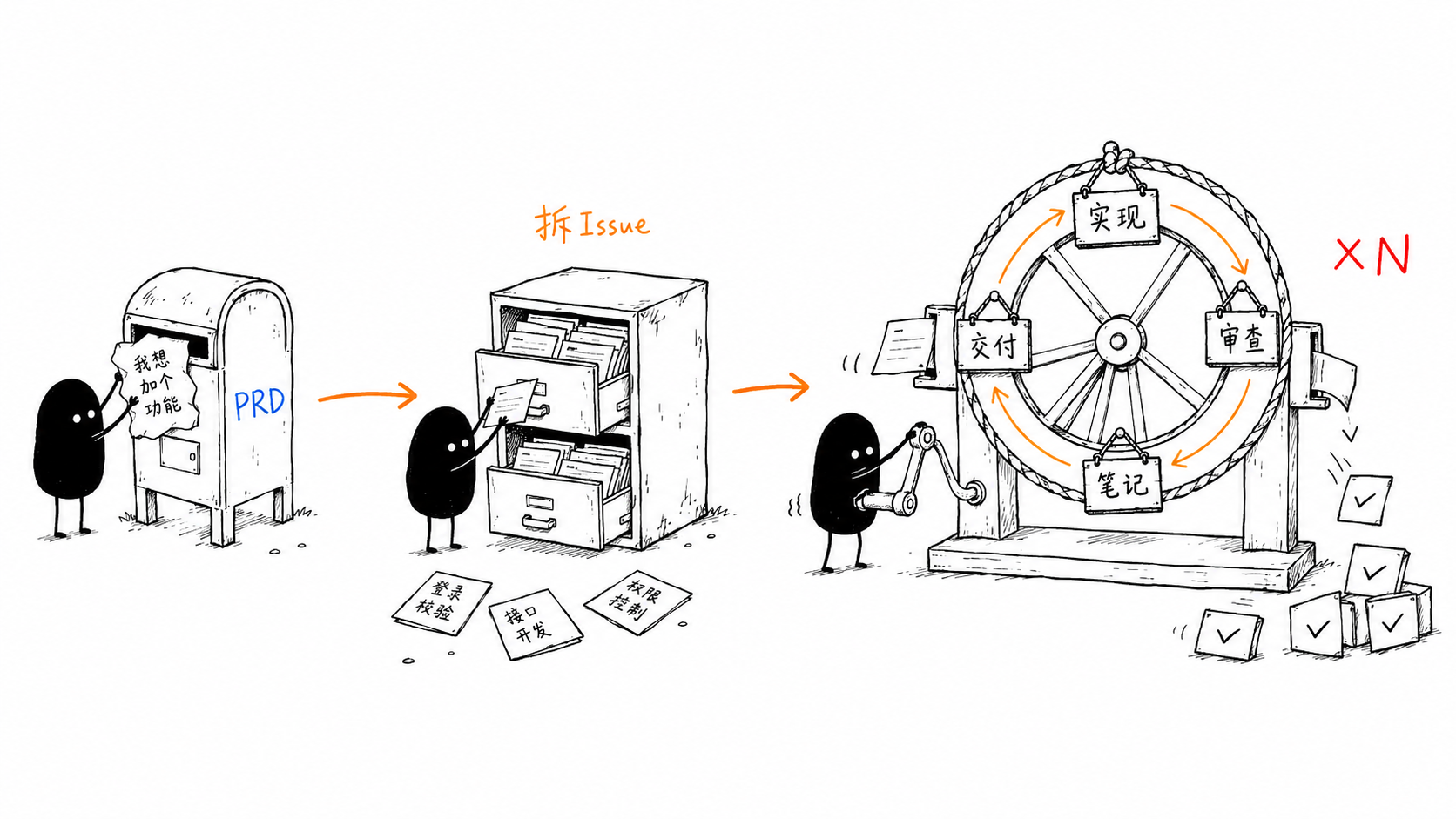
.loop-state.json to your .gitignore. If the loop crashes, just run /loop-it again — it will detect the state file and offer to resume.
18. Bonus: /to-design — PRD to Design Document
/to-design turns a PRD (or a rough idea) into a design document written in the style of Go's official design proposals: plain language, concrete examples, and — above all — an honest account of why this approach and not the alternatives.
/to-design to settle direction, then /prd-to-spec for the contract.
How to Invoke
# Type directly in Claude Code
/to-design tasks/prd-priority-system.md

# Or use trigger phrases
Design doc: write a design doc for the priority system
prd-to-design: based on prd-user-auth.md
When to Use
- A PRD exists and you need to decide how to build it before committing
- The approach has real tradeoffs you want documented and debated
- The change is risky, breaking, or hard to reverse (a design doc forces the compatibility conversation early)
- Multiple people need to agree on a direction before work fans out
- You want a durable record of "why we chose X and rejected Y" — even if later rejected
Design Document Structure (distilled from 5 Go proposals)
| Section | Purpose |
|---|---|
| Abstract | The whole doc in one paragraph, with the single most important promise embedded (e.g. backward compatibility) |
| Background | Explain the pain with concrete examples or real buggy code — quantify it, don't pile on adjectives |
| Design | The body. Declaration + example + boundaries, taught progressively from simple to complex |
| Rationale | The key section: proactively lists the rejected alternatives and why they were dropped |
| Compatibility | For any breaking change, admit it head-on; honestly list the cost and a gradual migration path |
| Implementation | Back up "it's shippable" with data and tooling, not a hand-wave of "risk is manageable" |
| Appendix | (Optional) full API, end-to-end examples, FAQ |
Workflow
- Locate input (PRD file / Issue URL / pasted content / just an idea)
- (Optional) Scan the codebase: existing patterns, constraints, real pain to quote
- Find the genuine "forks in the road" and ask 3-5 clarifying questions
- Generate the design doc in Go-proposal style
- Present for review — steer feedback to Rationale and Compatibility
- Save to
tasks/design-[feature-name].md
19. Bonus: /graph — Parallel Task-Graph Execution
/graph turns a task (or PRD / SPEC / issue set) into a directed acyclic graph (DAG), layers it by dependency into supersteps (waves), then implements the independent nodes of each wave concurrently: one subagent per node runs the full /goal → /review-it → /ship-it pipeline inside its own git worktree, with a fan-in barrier between waves that integrates results and dynamically re-plans the next wave.
/loop-it is strictly sequential — one worktree, one issue at a time. /graph is its parallel counterpart — it fans out every independent node in a wave at once. Use /graph when the DAG has genuine parallelism (independent subsystems); use /loop-it when nodes heavily share files or serial safety matters.
The design borrows from the trending idea of graph engineering, LangGraph's StateGraph / Pregel-BSP superstep model, and Claude's dynamic-workflow orchestration.
How to invoke
# Type directly in Claude Code
/graph tasks/prd-url-shortener.md

# Or use trigger phrases
parallel implement: turn these issues into a task graph and run in parallel
build a graph: fan out the DAG concurrently
Core concepts (from LangGraph / graph engineering)
| Concept | Meaning |
|---|---|
| Node | One implementable unit of work (an issue / subtask) |
| Edge | A dependency: B depends on A → edge A → B |
| Superstep / Wave | A set of nodes whose deps are all satisfied — run concurrently |
| Fan-out | Dispatch one subagent per node in the current wave |
| Fan-in (barrier) | Wait for all nodes in the wave before the next |
| State channel | .graph_state — shared checkpoint between waves, resume source |
| Live tracker | graph.html — Claude-style light-theme dashboard, re-rendered from .graph_state at every checkpoint |
| Dynamic re-plan | Revise the graph after a wave if new work/deps emerged |
Workflow
- Decompose into nodes — reuse
/to-issuesrules; each node has title, deps, acceptance criteria, type, and scope_hint (files it's expected to touch) - Build the DAG & validate — detect cycles (break by id), dangling deps, scope collisions
- Topological layering — Kahn's algorithm layers nodes into waves; nodes editing the same logic serialize to the next wave
- Render the graph & confirm — emit the layered plan + a Mermaid diagram, wait for user confirmation before fan-out
- Execute wave by wave — fan-out (multiple subagent calls in one response = parallel) → fan-in barrier → integrate, update state, dynamically re-plan
Key features
- Worktree isolation (mandatory) — each node owns a git worktree; parallel edits never clobber the working tree
- Fan-in barrier (mandatory) — wave N+1 cannot start before every node in wave N merges (BSP semantics)
- Scope-collision serialization — dep-free nodes editing the same logic split across waves; a shared "wiring file" (router/main) is exempt so it doesn't serialize the whole graph
- Dynamic re-plan — subagents report new work via a
NEW_WORK:line; the barrier revises and re-layers the graph - Failure blocks dependents — a failed node marks all its dependents blocked and skips them
- Checkpoint / resume — each wave writes
.graph_state; a crash resumes at the wave boundary, andgraph.htmlis re-rendered (open it in a browser — it auto-refreshes every 5s to track waves, node statuses, and progress live) - Concurrency cap — default 3–4 parallel subagents to avoid rate limits and merge contention
Concurrent execution
# Per wave: fan-out → fan-in barrier
Wave 0 (parallel×3):  #1 db schema   #2 cache layer   #3 logging util
Wave 1 (parallel×2):  #4 API (deps #1)   #5 CLI (deps #2)
Wave 2 (parallel×1):  #6 integration (deps #4,#5)

# Each node, in its own worktree:
inline /goal → /review-it → /ship-it
Pipeline integration
/prd → /prd-to-spec → /to-issues ┬→ /loop-it  # sequential: one node at a time
└→ /graph # parallel: whole wave at once.graph_state and graph.html to .gitignore. Subagents run in parallel only when dispatched as multiple calls in a single response — splitting them across responses degrades to sequential.
20. Bonus: /understand — Interactive Change Review
/understand turns the changes you just generated (usually AI-written) into a single-file interactive review webpage, so you can actually understand what changed before reviewing or shipping it. It scans the repo's uncommitted / branch changes and builds a Claude-style light-themed two-column page: a project file tree on the left, and the selected file's syntax-highlighted diff on the right, with a side rail that pairs each code segment with its unit requirement and a plain-language explanation.
How to Invoke
# Type directly in Claude Code
/understand

# Or use trigger phrases
Review changes: Explain what this batch of new code does
Understand code: Walk me through the freshly generated changes
What You Get
| Area | Content |
|---|---|
| Left tree | Changed files laid out by real project structure; per-file +/− stats and A/M/D/R status. The column is drag-resizable (double-click the divider to reset). |
| Right diff | Syntax-highlighted diff with additions / deletions clearly distinguished from unchanged code, real file line numbers. |
| Side rail | Per-segment cards: the related unit requirement (or a grey "inferred intent" tag when guessed) plus a plain-language code explanation; click to jump and flash the matching lines. |
How It Works
- Scan changes: committed (base..HEAD) + staged + unstaged + untracked files, baseline = merge-base with the main branch
- The agent reads every change, then writes requirement + explanation annotations
- Render a self-contained
.understand/report.htmland open it in the browser
Positioning
/understand is a comprehension companion to /review-it: where /review-it finds and fixes issues, /understand helps you see the intent and rationale behind freshly generated code before you commit to it.
.understand/ is a generated artifact directory — add it to .gitignore so it isn't accidentally committed. Explanations and requirements are always produced in Chinese.
21. Bonus: /walkthrough — Phase-2 Walkthrough Plan
/walkthrough produces the Phase-2 walkthrough artifact (modeled on Google Antigravity's walkthrough plan): once implementation and verification are complete, it writes a single Markdown file that lets you quickly catch up on what was changed and what is proven to work, and lets you do a staging-check with Git before merging. It is saved to tasks/walkthrough-[feature].md by default.
How to Invoke
# Type directly in Claude Code
/walkthrough

# Or use trigger phrases
Walkthrough: Generate the Phase-2 walkthrough for this change
生成走查文档
The Four Sections
| Section | Content |
|---|---|
| Change Summary | High-level description of the refactor / new components / pages created, written for a fresh reader. |
| Verification Steps | Terminal commands + unit tests that ran successfully, and automated browser testing outcomes (open the app, click through the demo path, pass/fail per scenario). |
| Visual Proof | Screenshots or screen recordings captured during browser testing, embedded directly in the file (base64 data URIs) so it renders anywhere. |
| Review Gate | Final git status / git diff --stat, a draft PR description, and a merge checklist for staging the change before merging. |
How It Works
- Determine the change scope from the branch / Issue / tasks/ PRD
- Read the diff and write the Change Summary
- Run tests and browser walkthroughs, capture real output + screenshots
- Save
tasks/walkthrough-[feature].mdand present the review gate
Positioning
/walkthrough is the final checkpoint before /ship-it: after /goal implements and /review-it fixes, it captures proof and a review gate so the merge is a deliberate, staged decision — not a blind one.
22. Supported Platforms
Goal Workflow skills can be used across multiple AI Coding Agents:
| Agent | /prd | /prd-to-spec | /to-issues | /goal | /review-it | /note-it | /ship-it | /loop-it | /refactor | /modern-go | /code-to-spec | /smell | /humanize-it | /insight-diagram | /to-design | /graph | /understand | /walkthrough |
|---|---|---|---|---|---|---|---|---|---|---|---|---|---|---|---|---|---|---|
| Claude Code | ✓ | ✓ | ✓ | ✓ (Built-in) | ✓ | ✓ | ✓ | ✓ | ✓ | ✓ | ✓ | ✓ | ✓ | ✓ | ✓ | ✓ | ✓ | ✓ |
| Codex | ✓ | ✓ | ✓ | ✓ (--goal) | ✓ | ✓ | ✓ | ✓ | ✓ | ✓ | ✓ | ✓ | ✓ | ✓ | ✓ | ✓ | ✓ | ✓ |
| OpenCode | ✓ | ✓ | ✓ | — | ✓ | ✓ | ✓ | ✓ | ✓ | ✓ | ✓ | ✓ | ✓ | ✓ | ✓ | ✓ | ✓ | ✓ |
| DeepSeek TUI | ✓ | ✓ | ✓ | — | ✓ | ✓ | ✓ | ✓ | ✓ | ✓ | ✓ | ✓ | ✓ | ✓ | ✓ | ✓ | ✓ | ✓ |
Issue Creation Platforms
| Platform | Tool | Description |
|---|---|---|
| GitHub | gh issue create | Requires gh CLI authentication |
| Local | Markdown files | Saved to local directory |
| Baidu iCafe | icafe-cli | Requires iCafe space parameters |
23. FAQ
Q: Do I have to use all steps in order?
No. Each Skill is independent and can be used standalone. For example, if you already have Issues, you can start directly from /goal; if code is already written, you can use /review-it directly. But going through the full workflow yields the best results.
Q: Where does /goal come from? Why isn't it in the skills directory?
/goal is a built-in feature of Claude Code and doesn't require separate installation. The Issue format generated by this workflow's /prd perfectly matches what /goal expects as input.
Q: Can I use this in non-GitHub projects?
Yes. /prd supports saving Issues as local Markdown files or creating them in Baidu iCafe. /review-it only needs a local git repository. /ship-it currently depends on GitHub (gh CLI).
Q: How is /review-it different from manual code review?
/review-it is automated self-review, catching obvious issues before submission. It doesn't replace team code review, but rather improves code quality before PR creation, reducing the low-level issues reviewers need to point out.
Q: How big should an Issue be?
Each Issue should represent work an agent can complete in a single session — typically 1-3 files of changes with clear acceptance criteria. /prd automatically breaks down at this granularity, but you can adjust before confirming.
Q: How do I use this with Codex?
When installing via npx skills add, choose -a codex. In Codex, use codex --goal "..." instead of /goal. /review-it works universally across agents.
Q: Is /prd-to-spec required? When can I skip it?
Not required. /prd-to-spec is an optional step. PRD says "what to do"; SPEC says "how to do it". The distinction: an AI agent executing /goal inherently possesses the "how" capability — it automatically analyzes the codebase, understands existing architecture and conventions, and makes reasonable technical decisions during implementation. In other words, the AI agent is a living SPEC engine — it doesn't need it drawn on paper first.
Most small to medium features work perfectly fine with just PRD → /goal. The following scenarios justify the extra step of /prd-to-spec:
- Multi-person/multi-agent parallel development — need shared technical conventions to avoid divergent implementations
- Changes spanning multiple services/modules — architecture decisions have broad impact and rework costs are high
- Need maintained documentation — a formal technical reference for the team to consult later
- Compliance/review requirements — organizational process mandates design documents
- PRD is too vague — SPEC can supplement with technical details to reduce agent interpretation variance
If your project is single-developer, feature boundaries are clear, and the agent already reliably understands the project structure, skipping /prd-to-spec is entirely reasonable — and often more efficient. Treat it as an optional tool in your toolkit — bring it out only when needed.
Q: Where does the 42 iteration limit in /humanize-it come from?
The number 42 isn't due to any special iteration requirement, but a geek culture tribute to the classic sci-fi novel The Hitchhiker's Guide to the Galaxy. In the book, a supercomputer computes for 7.5 million years and arrives at "the Answer to the Ultimate Question of Life, the Universe, and Everything" — which is 42. In programming circles, this number is popular for two reasons:
- Sci-fi tribute: A well-known Easter egg among programmers, representing the ultimate answer.
- ASCII coincidence: In ASCII encoding, 42 corresponds to the asterisk
*. In computer science,*is commonly used as a wildcard meaning "anything" or "everything is possible." So "the ultimate answer is 42 (*)" perfectly aligns with the philosophical joke that it's "whatever answer you want."
In practice, most documents reach quality standards within 3-5 iterations. The core of iteration is intelligent strategy switching — when one rewriting approach plateaus, it automatically switches to another. The three strategies complement each other to cover different types of AI traces.
Q: Does /humanize-it support English documents?
Currently, the three sub-skills of /humanize-it are primarily optimized for Chinese text. humanizer-zh's pattern detection rules partially work for English as well, but rewriting effects are best for Chinese.
Q: What diagram types does /insight-diagram support?
/insight-diagram supports 17 diagram types, including system architecture diagrams, 14 UML diagrams (class, object, component, deployment, package, composite structure, profile, use case, activity, state machine, sequence, communication, timing, interaction overview), flowcharts, and swimlane diagrams. Output is in HTML+SVG format, saved to the docs/ directory. Applicable to any software project.